
If you want to track your heart rate, you have more options than ever. The Apple Watch has become the go-to wearable for health monitoring, but smartphone apps that measure pulse through your phone’s camera have gained serious traction too.
So which method actually gives you more accurate readings? The answer might surprise you.
How Apple Watch Measures Heart Rate
The Apple Watch uses a technology called photoplethysmography (PPG) – the same underlying science used by hospital pulse oximeters. Green LED lights on the back of the watch flash hundreds of times per second, and sensors detect how much light is absorbed by blood flowing through your wrist.
When your heart beats, blood flow increases and more green light is absorbed. Between beats, less light is absorbed. The watch analyzes these fluctuations to calculate your heart rate.
The Apple Watch also uses infrared light for background readings and can leverage data from its accelerometer and gyroscope to filter out motion artifacts during exercise.
How iPhone Camera Apps Measure Heart Rate
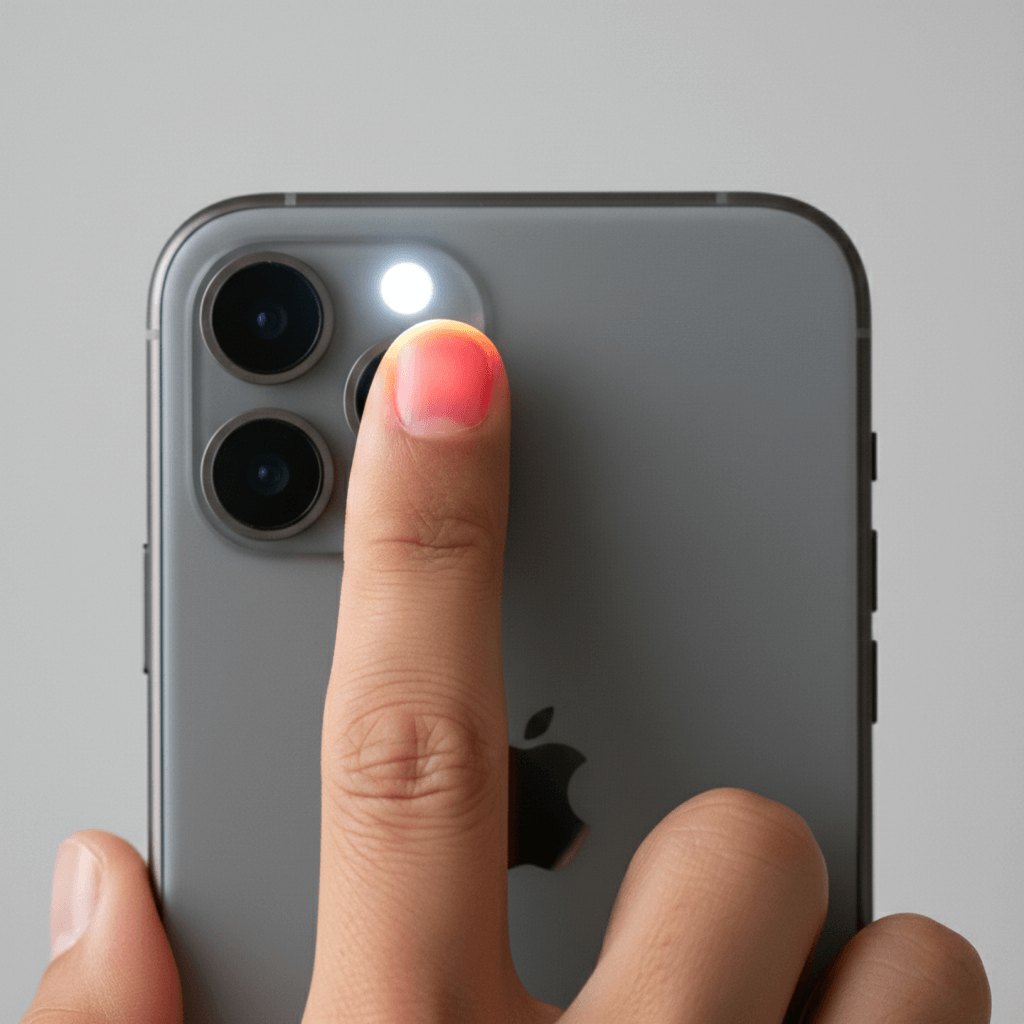
iPhone heart rate apps use the same PPG principle – but with a different approach. Instead of dedicated sensors on your wrist, these apps use your phone’s camera and flash.
You place your fingertip over the camera lens, and the flash illuminates the blood vessels beneath your skin. The camera detects subtle color changes as blood pulses through your finger with each heartbeat. Advanced algorithms then analyze these patterns to determine your heart rate.
This is essentially the same method nurses use when they clip a pulse oximeter to your finger – widely considered the gold standard for non-invasive heart rate measurement.
What the Research Says
Multiple studies have compared wrist-based wearables to fingertip measurements, and the results are interesting.
At rest: Both methods perform well. Studies consistently show that Apple Watch resting heart rate measurements are accurate within 1-2% of medical-grade equipment. Fingertip-based measurements – whether from dedicated pulse oximeters or smartphone apps – show similar accuracy, often within 1-3 beats per minute of clinical readings.
During exercise: This is where differences emerge. Wrist-based optical sensors can struggle with motion artifacts – the watch moving on your wrist, sweat affecting sensor contact, and rapid arm movements all introduce potential errors. Research has shown accuracy can drop by 10-20% during high-intensity or erratic movements.
Fingertip measurements aren’t practical during exercise (you can’t run while holding your phone), but they avoid these motion-related accuracy issues entirely when used at rest.
For specific populations: Wrist-based sensors can be less accurate for people with darker skin tones, tattoos on the wrist, or certain circulation issues. The Apple Watch has improved significantly in recent generations, but some accuracy gaps remain. Fingertip measurements tend to be more consistent across different skin tones and conditions.
Apple Watch: Strengths and Limitations
Strengths
Continuous monitoring – The Apple Watch tracks your heart rate throughout the day without any action required. It logs resting heart rate, walking heart rate, workout heart rate, and recovery metrics automatically.
Exercise tracking – Despite some accuracy limitations during intense movement, having real-time heart rate data during workouts is valuable for zone training and effort monitoring.
Additional health features – ECG readings, irregular rhythm notifications, blood oxygen monitoring, and fall detection add significant value beyond basic heart rate tracking.
Convenience – It’s always on your wrist. No need to stop and take a measurement.
Limitations
Cost – Apple Watch prices range from $249 to $799+ depending on the model. That’s a significant investment for heart rate monitoring.
Battery life – Daily charging is required. If your watch dies, your tracking stops.
Accuracy variables – Fit, skin tone, tattoos, sweat, and motion can all affect reading accuracy.
Wrist placement – The wrist isn’t the ideal location for optical heart rate sensing. It’s convenient, but blood vessels are smaller and further from the surface compared to the fingertip.
iPhone Camera Apps: Strengths and Limitations
Strengths
Fingertip accuracy – The fingertip has strong blood flow close to the surface, making it an ideal measurement location. This is why medical pulse oximeters use the finger rather than the wrist.
Accessibility – Nearly everyone already owns a smartphone. No additional hardware purchase required.
Cost-effective – Most heart rate apps are free or cost a few dollars – a fraction of wearable prices.
Consistent readings – Without motion artifacts and with optimal sensor placement, fingertip readings tend to be highly consistent.
Works for everyone – Fewer accuracy issues related to skin tone, tattoos, or wrist size.
Limitations
Manual measurement required – You have to actively take each reading. There’s no passive, continuous monitoring.
Not practical during exercise – You can’t measure while running, cycling, or lifting weights.
Requires stillness – For accurate readings, you need to hold your finger steady for 30-60 seconds.
Dependent on technique – Pressing too hard, too light, or moving during measurement affects accuracy.
Which Is More Accurate?
Here’s the honest answer: it depends on when and how you’re measuring.
For resting heart rate measurements: iPhone camera apps can match or exceed Apple Watch accuracy. The fingertip is simply a better location for optical sensing than the wrist. When you’re sitting still and taking a deliberate measurement, a well-designed smartphone app provides clinical-grade accuracy.
For continuous and exercise monitoring: Apple Watch wins by default – you can’t use a phone app while running. And having 24/7 passive data collection reveals patterns that spot measurements miss.
For occasional health checks: If you want to check your resting heart rate a few times per day, track trends over time, or simply understand your baseline cardiovascular health, a smartphone app is more than sufficient – and far more affordable.
The Best Approach: It Depends on Your Goals
Choose Apple Watch if you:
- Want continuous, passive heart rate monitoring
- Need real-time data during workouts
- Value additional health features like ECG and blood oxygen
- Don’t mind the cost and daily charging
Choose an iPhone app if you:
- Primarily want accurate resting heart rate measurements
- Want to track trends without buying expensive hardware
- Prefer the accuracy advantages of fingertip measurement
- Need an accessible option that works regardless of skin tone or wrist characteristics
Consider using both if you:
- Want the best of both worlds – continuous tracking plus highly accurate spot checks
- Want to verify your Apple Watch readings periodically
- Are serious about understanding your cardiovascular health from multiple angles
The Bottom Line
The “accuracy debate” often misses the point. Both Apple Watch and iPhone camera apps use proven technology and deliver readings accurate enough for personal health tracking. Neither replaces medical equipment, but both provide valuable insights.
What matters most isn’t which device measures to the nearest decimal point – it’s whether you actually use it consistently. The best heart rate monitor is the one you’ll use regularly to track your health over time.
For many people, a smartphone app offers the perfect balance: accurate fingertip measurements, zero hardware cost, and simple tracking that reveals meaningful trends in your cardiovascular health.
This article is for informational purposes only and is not intended as medical advice. Neither consumer wearables nor smartphone apps should be used to diagnose medical conditions. Consult a healthcare provider for concerns about your heart health.
Try Pul AI free. Get accurate heart rate readings using just your iPhone camera – no expensive wearables required. Track your resting heart rate over time and understand your cardiovascular health better. Download now and see how your numbers compare.